Library Services Online

In our 24/7 society, life moves pretty fast. You meant to stop by the library on your way into work, or perhaps on your way home, but…

Yeah, we’ve all been there. Too much to do and not enough time to do it. But, never fear! The Cheshire Public Library is here to help. Many library services are now available online 24/7.

That means you can renew your books while staying at home in your pajamas. You can download and watch a movie from hoopla rather than having to go out on a dark and stormy night (with a nod to Edward Bulwer-Lytton) to borrow one. You can place holds, listen to music, or download an audiobook. Research your family tree on HeritageQuest. Scope out the ratings of your next new car from the comfort of your bed by browsing Consumer Reports Online. Refresh your resume with tips from JobNow. Put up your feet and browse through your favorite magazine with RBdigital‘s online magazines.

The great thing about online resources is that they are never late! They auto-return so you never accrue fines, and in the case of digital magazines, they remain on your device for you to enjoy.

Finding these resources is easy.

All downloadable content (ebooks, audiobooks, movies, magazines, music, and comics) are available from links right on the library homepage at cheshirelibrary.com.

All databases (Consumer Reports, JobNow, HeritageQuest and many, many more) are accessed simply by clicking the eResources link on our website.

Renew your books, place holds and even pay your account balance by clicking the Your Account button at the top of our website.

So, relax! You have all day and all night, too, to get to the library.

(Image source: Anchor Point Animation)

Staff Picks are everywhere!

If there’s one thing we love, it’s recommending books. A walk through our main & lower levels will reveal a dozen or more themed book displays featured throughout, which we change and update frequently. There’s also our “Reader’s Depot” on the main level, which features the current NYT Bestsellers Lists, release dates for upcoming titles, read-alike lists, and more.

Anyone going through the Checkout area has seen our Staff Picks wall. This wall is filled in daily with books our staff members have read and enjoyed. There’s ALWAYS something good to read there!

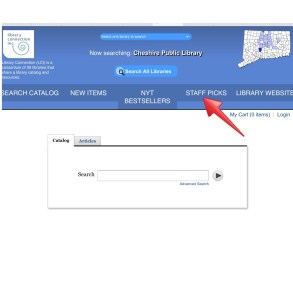
You may not know that there is also a “Staff Picks” page in our catalog. Staff members have put together some themed book lists there for you to peruse. You can browse these Staff Picks right from home, and if you see something you like, reserve a copy online!


If you’re reading this blog, you already know there are a ton of reading suggestions here. Elsewhere on social media, our Tumblr is full of book lists & book news, too.  And of course, you can always come right out and ask us for reading suggestions. Or let us know about a book you enjoyed. We love getting book recommendations almost as much as giving them!

Vacation Reading

I don’t know about you, but I like to read on vacation. Considering I work in a library, it’s probably not surprising that I like to bring a book with me wherever I go, but vacation reading is special. Laying about, maybe on a beach or by a pool, with nothing on my schedule but relaxing with a book is my idea of a perfect vacation.


One wrinkle in this perfect plan, though,  is getting the books from here to there. How many to pack? (don’t want to run out…) How much book-space is in the suitcase? Are these books going to put me over the baggage weight limit?


This is where eBooks become the vacationing bibliophile’s best friend. You can bring 10 (or 20, or 30!) books with you in less space than 1 book would take in your luggage.  Rapture!
As I write this I am preparing to head out on a vacation myself, and believe me, I have loaded my ereader with plenty of reading material for my trip, downloaded for FREE from the library.  I use an e-ink reader (the kind with a monochrome screen, like Nook GlowLight and Kindle Paperwhite), so OverDrive is my go-to for downloading eBooks from the library.  I can borrow up to 10 titles at once, and keep them on my ereader for up to 21 days, after which they will return themselves. No worries about overdue books on my vacation.

If you prefer to read on a tablet (color screen, like an iPad), there are even more options for downloading eBooks. You can use the OverDrive App for iPad & Android to download & read eBooks. You can also use the hoopla app to download 5 books a month for up to 21 days, and they’ll return themselves at the end of the lending period. Super simple, and best of all free, with a Cheshire Library card.

I’ll be by the pool…

Look It up on lynda.com

lyndatutorIf you don’t have time to take a full class or just need a quick answer, lynda.com can help. For those who have never used lynda.com, it is a site of over 3,000 online courses available on the cheshirelibrary.com/elearning page of our website for anyone who holds a current Cheshire Public Library Card.

I frequently use the lynda online classes as a place to find answers to software questions. Need to know how to display all worksheet formulas in Excel? lynda’s Excel 2016 Tips and Tricks course has the answer. Simply scan the table of contents on the left side of the page and click on Display all worksheet formulas instantly. Three minutes and thirty seconds later you will have the answer.

That’s one of the things that is so wonderful about lynda.com. All courses are divided into short videos that are easily searchable. Word 2016 got you down? lynda has a course titled Word 2016 Essential Training. From getting started to formatting text, to using style and themes and many more complicated endeavors, this course has the answers you’re looking for. The entire course is five hours and forty-one minutes, but the average video chapter is only two to three minutes. Videos like Adding pizzazz with special text effects, Illustrating with WordArt, and Getting documents ready for sharing, can save you loads of time.

The number of topics covered in the lynda.com courses is truly astonishing. Photography. Game Design. Microsoft Office. Music. Test Prep. Business Topics. Educator Tools. And on and on.

You can access lynda.com from our website at cheshirelibrary.com/elearning. You must have a Cheshire Library card to login. Once you do, all the answers you need  are only a few minutes away.

Note: lynda.com charges libraries based on the population served by the library.  So when a library subscribes, lynda.com restricts access to those who have cards from that library. If you are not a Cheshire resident, check with your hometown library. More and more libraries are offering lynda.com to their patrons. If you are a Cheshire resident and do not have a card, you can apply for a card online or in person at the library.

Teach Yourself Technology

technology support help me please!

At Cheshire Public Library’s weekly Drop-In Tech Help, I am often told that people don’t know where to begin with learning technology. They ask me what special resource of knowledge I use and where I went to school and how long it took me to learn all of these tricks and devices. The answer is simple: There is no secret knowledge! I use books and the internet, and you can, too.

If you recently got a new device or you feel overwhelmed by your device’s capabilities, start with a book. The library has a variety of books on popular devices, and we can always get something for you if we fail to carry it. Books are great for starting out with a new computer, smart phone, or tablet. You can look up topics like Setting Up Your Email or page through the whole book at your own pace. Most technology books are visual, and you can go through step-by-step instructions with your device at your side.

If you prefer video instruction, you can try Lynda.com, which is now available for all Cheshire Public Library resident cardholders. Lynda.com is an online learning site that hosts a constantly growing library of over 3,000 courses.

What are you waiting for? Here’s a small sample of the books we have available:

jacket-aspx iPhone: The Missing Manual by David Pogue

Covers all models with iOS 8.1 software, including iPhone 6 and 6 Plus.


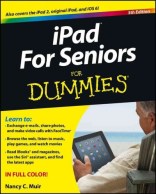
jacket-aspx iPad for Seniors by Nancy Muir

Learn about all the incredible things your iPad can do with this friendly guide. Learn to make video calls, navigate with maps, find almost anything with Siri, and more!


jacket-aspx Teach Yourself Visually: Android Phones and Tablets by Guy Hart-Davis

Includes customizing your phone or tablet, working with text and voice, making calls and instant messaging, enjoying social networking, working with apps, browsing the web and e-mailing, taking and using photos and videos, using maps, Google Earth, and clock, playing music and videos, troubleshooting your device.

jacket-aspx Kindle Fire HDX for Dummies by Nancy Muir

Also covers the Kindle Fire HD!


jacket-aspx My Windows 10 by Katherine Murray

An easy, full-color tutorial on the latest operating system from Microsoft.


Technology Help – Need device advice? Come to Drop-in Tech Help. No appointment necessary. We provide help with smartphones, laptops, tablets, ereaders, email, Facebook, social media, and more! Check out the calendar for our next session.