
Facebook has 2 billion monthly active users (source), and you’re probably one of them.
A Google search for your full name and location is likely to pull up your Facebook profile as the first result. What will snoopers find out about you? Probably not much, right?
Wrong.
If you don’t take steps to lock down your Facebook account, searchers will easily see:
- What you look like
- What your significant other or family looks like
- Where you live
- Where you work
- Your relationship status
- Your likes
- ….even your political views!
Luckily, keeping Facebook information restricted to your Facebook “Friends” isn’t too difficult. Here are some tips to get you started:
First, never post anything with a public audience unless you’re okay with the entire world seeing it. Always check your audience before posting and ensure it’s set to “Friends” and never “Public.”
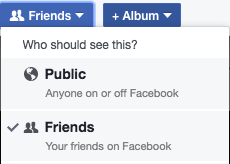
Second, if you’ve posted publicly in the past, you can set those old posts to “Friends” with one click. Simply click on the triangle in the upper-right of the screen and select “Settings.” From there, go to Privacy and click “Limit Past Posts.” Everything you ever posted with a “Public” audience will be set to “Friends.” I also recommend changing who can look you up by phone number and email to “Friends” and opting NOT to be indexed by search engines.

To check how your profile looks to the public, head over to your profile page and click on the three dots “…” and “View as.” You will then see your profile as it appears to non-“Friends.”

Keep in mind that every time you change your Profile and Cover photos, these are set to “Public” by default with all descriptions, likes, and comments made public, too. If you’re feeling fancy, you can manually change the privacy settings of your Profile photo when you view the photo. Simply click on the “globe” icon and select “Friends” to ensure only your friends can see the likes and comments. Your current Cover photo must always be set to public (Facebook won’t let you change this), however you can change it back to “Friends” when you swap it out for a new cover photo.
Facebook will also post a public update to your Timeline each time you update your Profile and Cover photos. I recommend clicking on the little arrow and selecting “Hide from timeline” so the entire world won’t know you were updating your cover photo to the latest snapshot of your cat at 3am last night.
Be mindful of what else is public on your profile, too. Is your workplace “Public”? Your relationship status? You can change these to “Friends” by clicking the edit pencil to the right of each entry.

I hope these tips were helpful! Social media is an amazing tool, but remember to be mindful of your own privacy.
Technology Help – Need device advice? Come to Drop-in Tech Help. No appointment necessary. We provide help with smartphones, laptops, tablets, ereaders, email, Facebook, social media, and more! Check out the calendar for our next session.
 The Cheshire Library Blog