It’s National Audiobook Month – 10 Great Audiobooks to Listen to With Your Kids

book_stack_headphones

Do you feel like you spend all your time driving your children back and forth from school, to practice, to friends houses, to wherever? These days we are all busy, and parents chauffeuring their children around know it well.  Whether it is on the way to scouts, sports, or a family vacation you can turn a search for quiet into some serious quality time. Put that CD player or iPod to work and steer your car-full towards some of your childhood favorites, or new popular books, and you have the bonus of knowing exactly what they are reading (or hearing as they case might be) so that you can start conversations about the books with your children.

Many classic and new, popular books for children are now available on audiobook, and they are often read by very talented voice actors, the author, or sometimes even a full cast of voices. Here are ten quick suggestions, in no particular order,  for audiobooks you might want to listen to with your children or for your own enjoyment.

1. The Girl Who Circumnavigated Fairyland in a Ship of her own Making, written and read by Catherynne M. Valente.[Cover]

2. Harry Potter and the Sorcerer’s Stone (and the rest of the series), written by J.K. Rowling and read by Jim Dale.

3. Anything written and read by Neil Gaiman, such as Coraline, M is for Magic or The Graveyard Book.

4.Green Eggs and Ham and other Servings of Dr. Seuss, read by Jason Alexander, Michael McKean, and David Hyde Pierce.

5. The Lightning Thief, written by Rick Riordan and read by Jesse Bernstein.[Cover]

6. The Strange Case of Origami Yoda, written by Tom Angleberger and read by Mark Turetsky, Greg Steinbruner, Jonathan Todd Ross, Julia Gibson, and Charlotte Parry.

7. Tales of a Fourth Grade Nothing, BlubberFreckle  Juice, or anything else from Judy Blume. Some books are read by the author, others by Halley Feiffer or Laura Hamilton.

8. Alice in Wonderland & Through the Looking Glass written by Lewis Carroll and read by Ralph Cosham.[Cover]

9. Magic Tree House Collection Books 1-8 (other book groupings are also available), written and read by Mary Pope Osborne.

10. The works of E.B. White, Charlotte’s Web and The Trumpet of the Swan read by E.B. White, and  Stuart Little, read by Julie Harris.

If you prefer downloading audiobooks rather than juggling cd’s in the car, do not forget that you can use Overdrive to download free audiobooks. Many of these titles, as well as more great audiobooks and e-books to share with the family can be found there as well.

Nancy Pearl’s First Children’s Audio Book

Nancy Pearl just might be America’s most well known librarian. She even has her own action figure! So it is little wonder that I was thrilled to read in USA Today  that she has recorded her first children’s audiobook. She has recorded the audiobook version of Isabella: Star of the Story, which was written by Jennifer Fosberry and illustrated by Mike Litwin.

Isabella: Star of the Show

Isabella: Star of the Story is a fun story which highlights an early love of reading and the use of imagination. When Isabella and her parents head to the library Isabella is transformed into  characters from some of the most popular children’s books. Isabella is briefly Alice, Dorothy, Peter Pan, and a number of other well known personas. When it is time to check out and head home, Isabella decides that it is best just to be herself, at least until it is reading time again.

If you are eager to hear Nancy Pearl at work, here is a book trailer for Isabella: Star of the Story that will give you a taste of what the audiobook will sound like.

This Disc Won’t Play! Part II – Scratch That Idea

So you’ve wiped down your CD or DVD, buffed it shiny, but it still skips, chirps, freezes, and refuses even to advance to the next section.  Now you’ve got a problem. Check that mirrored side.  Chances are, it’s covered with scratches.  Small scratches, especially those on audio media like CDs and audiobooks, and those that run outward from the center to the edge of the disc, may not have any effect at all on performance.  DVDs, however, are much fussier, and a minor ding may create havoc.  Scratches that run around the disc like an old record interfere the most.

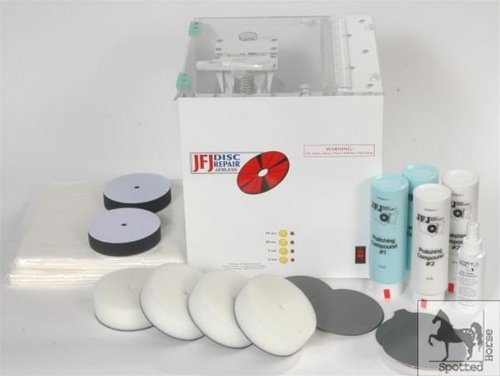
41I5j7KgWNL Cheshire Public Library has professional equipment for resurfacing media discs.  If simply washing and wiping doesn’t help, we put troubled discs through a three-step process. Seriously damaged discs are scoured smooth with fine sandpaper, then buffed back into shape at high speed, and finished off with a polishing coat of protectant. Usually this is enough to bring them back into good-as-new shape. Small, light scratches will disappear; deep gouges – the kind you can click with your fingernail – are a very bad sign and usually cannot be repaired.

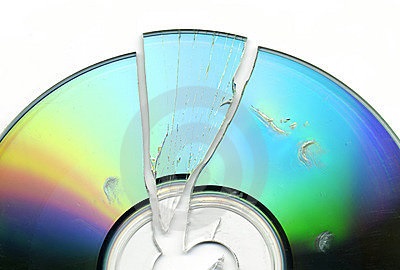
brokenSome damage cannot be fixed. Disc materials are a layer of polycarbonate, a layer of foil, and a layer of lacquer. Any damage to the foil layer, from pen marks, pavement divots, dog teeth, to separation of layers and peeling, is a death sentence for the disc. Likewise, cracks cannot be repaired, because they interfere with that all-important foil layer where the data is stored. Blu-Ray discs are generally much tougher than regular discs, which is good, because they cannot be repaired at all. Blu-Rays have a heavier coating that the cleaning machine cannot penetrate. Amazingly, despite several years of use, we have lost perhaps only two Blu-ray discs because of scratch damage.

The easiest way to keep discs working well is to be gentle with them!  Don’t wrestle them from packaging but press that center hub until the disk releases. Always handle them by the edges, and replace them in their case as soon as you are finished with them.  Make sure they click onto that hub – shaking around loose in the case will scratch them! Don’t let children play with them, and don’t leave them where your dog can chew them. Be especially careful with items you listen to in the car: the sand you carry in the carpeting of your automobile can damage a disc exceptionally fast. If a disc won’t work, let us know, so we can fix it as soon as possible – tell us which disc of a set, which scene or which track if possible.  If the case is broken and the disc is rattling inside, tell us, because those broken hubs are little scratch factories. Disc materials are an expensive part of library acquisitions, and we work hard to keep them in the best shape they can be.

This Disc Won’t Play! (part 1, Fingering the Culprit)

imagesYou’ve put in your favorite CD or DVD, and the stupid thing just won’t play!  It skips, it freezes, it pixelates into pretty colors, or the player spits it out and declares “Bad Disc!”  Your heart was set on that, and now you’re out of luck and your kids are getting cranky.

Don’t despair! The solution is often very simple. By far, the most common, annoying, easily fixable problem with disc materials is FINGERPRINTS.  Turn it over and look at the non-label side. It should look like a mirror.  Are there fingerprints?  Is coffee spilled on it? Or maple syrup (that’s happened)?  CLEAN THE DISC.

“But it’s a library disc!” you say.  “If I damage it, they’ll charge me!”  Don’t worry.  While discs are fragile, they’re more durable than you think.  Some of our discs have been used more than 150 times and still play fine. CDs and DVDs are made from polycarbonate, with a layer of foil (gold or aluminum) protected by a layer of lacquer.  That’s the same plastic as your eyeglasses!  General rule is, if it’s safe for your eyeglasses, it’s perfectly safe for a disc.  You can clean them with eyeglass cleaner, water, hand sanitizer, baby wipes, even liquid dish soap, but *make sure you clean them with a liquid*.  You can even rinse them under the tap if you must. To dry them, you can use a glass-cleaning cloth, a clean piece of flannel, or in a pinch, a clean cotton dishcloth or Tshirt.

DON’T: rub the mark with something dry, use a paper towel, newspaper, or rough cloth.  All these things will leave fine scratches on the polycarbonate.  If the laser can’t penetrate the polycarbonate layer, it can’t read your disc.  You can clean them with Windex or window cleaner, but repeated exposure to the ammonia in them can eventually dull and damage your disc. Don’t run them through the dishwasher.

cd-cleaningClean the disc, try it again.  Audio CDs (music or audiobooks) are very forgiving.  They can look scratched and still play fine. Sometimes it’s the player: what plays perfectly in your computer or your cd player won’t play right in your car. DVDs, with their video component, are much fussier, and Blu-rays the fussiest of all.  If it still won’t play right, bring it back, but stick a note on it or tell us, and we’ll give it a more thorough diagnostic.  Be especially careful with those awful double-sided DVDs – always hold them from the very edge, or you’ll be cleaning one side while dirtying the other.

With a little polish and a little luck, you’ll be singing along again in no time!