Did You Know: Lesser Known Library Materials

I was recently helping a patron at the circulation desk when someone returned a mobile hotspot. The patron I was helping was pleasantly surprised to learn that we have them available to borrow. As a result, I thought I’d write about some of the items the Cheshire Public Library has available that you may not be aware of.

We currently own six mobile hotspots you can borrow. What is a mobile hotspot? A mobile hotspot is a little box that works like a Wi-Fi router to bring you wireless internet. You power it up and can connect phones, computers, and TV streaming devices. They are great for traveling when you may not otherwise have access to the internet, and come with easy-to-follow directions on how to set them up and a number to call for help during library hours. Ask for one at the circulation desk on the main level or reserve one here.

Also great for vacation are selfie sticks! The two selfie sticks we have available use Bluetooth. You pair the selfie stick with your phone the same as other Bluetooth devices like speakers, keyboards, or Apple Watches by accessing Bluetooth settings on your phone. They are great for all kinds of situations: when no one is around to take your photo, when you want to photograph an expansive area beyond the reach of your arm, when you want everyone in your group to be in the photo, or when you’d rather not hand your smart phone to a stranger. Ask where to find them at the reference desk on the lower level or reserve one here.

Patrons are often surprised to hear we have boomboxes available to checkout. These are useful for audio books and music CDs. They can also play the radio, which is handy at the drive-in movies so your car battery doesn’t die! Ask where to find them at the reference desk on the lower level or reserve one here.

We also own three portable CD players. These include a car kit that attaches to your car stereo, making them another useful item for traveling! They are especially wonderful for listening to audio books during long drives when you don’t have a CD player in your vehicle. Like the selfie sticks and boomboxes, these can also be found on the lower level. Reserve one here.

While the games located in the Teen Room are for library use only, we do have an extensive selection of board games you can bring home to play. They are located on the main level near the Fiction books. You can find the list of what we own, and reserve one if you like, here.

Mobile hotspots and board games can be checked out for 2 weeks. Selfie sticks, boomboxes, and portable CD players can be checked out for 3 weeks. These items will automatically renew once as long as no one else has placed a hold on them.

Please note that the items listed above will be held behind the circulation desk on the main level for pick-up if you put them on hold, and not on the hold shelves at the front of the library. We ask that they all be returned to that same desk inside the library; they are all delicate, and we want to make sure they do not get damaged and are available for the next person.

The final items you can borrow for use outside the library are ones my own family has utilized throughout the years: museum passes! However, our passes are not just for museums. We also have passes for State Parks Centers, a Nature Center, and even Mystic Seaport! Look through our collection here, where you can decide whether to search by venue or date. You can reserve passes up to 30 days in advance.

Once you decide on your venue and date, simply print the pass from home*. If you don’t have a printer available, come to the library and ask to have it printed for you. Some of our passes are also available digitally and do not need to be printed at all. The printable/digital passes are good only for the date you reserve them, so no need to worry about late fees.

*While most passes can be printed out at home, the “CT State Parks Centers and Historical Buildings” pass must be picked up at our reference desk. This pass is subject to a $10 per day late fee. The “CT Science Center” coupon we offer must also be picked up at the library, but does not have any associated late fees.

The last items you may want to know about are not things to borrow, but rather things you may have left behind. The Cheshire Public Library has Lost and Found bins in both the adult and children’s areas; please ask about them next time you come in. We also keep smaller and/or more valuable items behind the circulation desk on the main level, so whether you are missing an earring, glasses, or a notebook full of all the books you’ve read, please be sure to ask.

I hope you found this information informative. If you have any other ideas for things you’d like to see The Library add to its collection, whether books or items, please let us know here. You never know, you might find it at at the library in the future!

Save Your Memories

In December of 1983, we didn’t have internet. We barely had personal computers – a 256k machine cost $500, and you had to program it yourself. You couldn’t just save to disk, you had to format the darned thing before you could even use it. Video tape machines cost $600, and DVDs were still a dream. We were on the cusp of the CD player, but the real world still ran on cassette tapes. 

I was no different, with a cassette tape built into my stereo, eagerly recording songs and programs off the radio as they played live. Yes, we still listened to live radio programs back then, whether Casey Kasem’s American Top 40 Countdown, or Radio Mystery Theater, or, on Sunday nights, Dr. Demento, the leading program for off the wall parody and novelty music.

What’s novelty music? Novelty music is a humorous song that doesn’t fit in any other category but entertainment. You know it well. Alvin and the Chipmunks is novelty music. Barnes and Barnes’ Fish Heads. The Purple People Eater. The Monster Mash. Itsy Bitsy Teeny Weeny Yellow Polka Dot Bikini. Steve Martin’s King Tut. Anything by Tom Lehrer or Weird Al Yankovic. While it’s a serious industry with all the requirements of mainstream music, and such songs can hit high on the pop charts (The Monster Mash hit #1), novelty music isn’t considered “serious” music. 

On that Sunday, it was the Christmas edition of Dr. Demento, and I threw a cassette in the player and hit record, because, back then, Grandma Got Run Over by A Reindeer was just a basement tape on Dr. Demento, it hadn’t gotten a contract yet. Weird Al wasn’t mainstream, and hadn’t gotten permission from the Kinks yet to record his Lola parody Yoda. On that tape, I happened, by luck, to record a song that in the history of radio may only have been played one time. It was a “bonus” track to fill space, and it was the only time it ever appeared on Dr. Demento. It hasn’t even been uploaded to his website. And it is one of my absolute favorites of underground tapes. In the era of the cold war, that song scared the living daylights out of me.

Cylent Night, by the Scrooge Brothers, tells a short story of the start of World War 3 to the tune of Silent Night, while air raid sirens start in the background and grow slowly louder. Off went the bomb at a quarter to three/ It’s the end of you and the end of me….  Have that hit you out of nowhere when you’re listening to the radio at 10 at night in your basement. In 40 years, I’ve never forgotten a line. And I just happen to have that song on tape. 

But cassette tapes are fragile things. They demagnetize. They fade. They tangle. My very rare basement tape has been bouncing around drawers and basements for 40 years. So what did I do? With the equipment at the Cheshire Public Library AV Studio, I very easily threw that cassette into the player and transferred that song to digital Media. Now I can store it digitally, share it with other Dementoids and Dementites who have never heard it (if you didn’t hear it live, you truly never heard it), even send it back to Dr. Demento. 

We all have those things kicking around our homes. Media changes so rapidly, from reel to reel tapes to 8 Track to cassette to CD to memory stick. We all have Grandma’s vacation slides of the Old Country, with relatives no one ever met. Dad’s wedding videos. That old LP you have that’s never been released on CD (or singles, like Rolf Harris’s Two Buffalos, which Bob Steele used to play on WTIC-AM). Your personal video of MTV’s top 100 countdown of 1985, when music videos were short stories of their own. You can transfer all of them to digital media, right here.

Beware, though – transfers occur in real-time. If you’re planning on transferring that 12-hour MTV countdown, it’s going to take 12 hours to put it onto digital. You might want to do it over a few weeks. But that LP? 40 minutes, you’ll be done.

Call (203) 272-2245 ext. 61245 to schedule an appointment at the AV Studio!

Still using the OverDrive app? It’s time to switch to Libby!

On May 1, 2023, the OverDrive app will be discontinued. Now’s the time switch to Libby, OverDrive’s newer reading app. Libby is made by the same people, with the same goal of connecting you to your favorite books, audiobooks, and magazines, and is streamlined to make finding and downloading digital materials easier than ever!

Why is the original app going away? Libby has actually been around since 2017, and and for that period of time OverDrive offered both options. Since then, Libby has seen much more use than the older OverDrive app, and it no longer made sense to maintain both apps.

Making the switch is easy! Simply download the app on your mobile device to get started. Good news, once you add your library card to Libby, all your loans and holds will be waiting on your Shelf! You won’t lose your place in line for any items you have on hold. If you have a Wish List, you’ll be prompted to import it from OverDrive via an in-app notification. Your wish list items will become a tag that’s available on your Shelf.

After checking out a digital item with Libby, you can read/listen right through the app. Prefer to read ebooks on a Kindle? Check out your ebook through the Libby app, then send it to Kindle and read it there:

  1. Tap Shelf.
  2. Tap loans at the top of the screen.
  3. Tap Read With….
  4. Tap Kindle.
  5. You’ll be taken to Amazon’s website. If prompted, sign into your Amazon account.
  6. Verify the “Deliver to:” device and tap Get Library Book to finish getting the book.

If you use a Kindle Fire tablet, you can sideload the Libby app to your Kindle Fire by following these instructions. You can also use the OverDrive website or Libbyapp.com in your Fire’s browser. 

Finally, if you’re more comfortable using a computer instead of a mobile device to access our digital collection, don’t worry, Libby works on a computer, as well! Visit libbyapp.com to browse, search, read or listen and more on your computer.

The New AV Studio at Cheshire Public Library

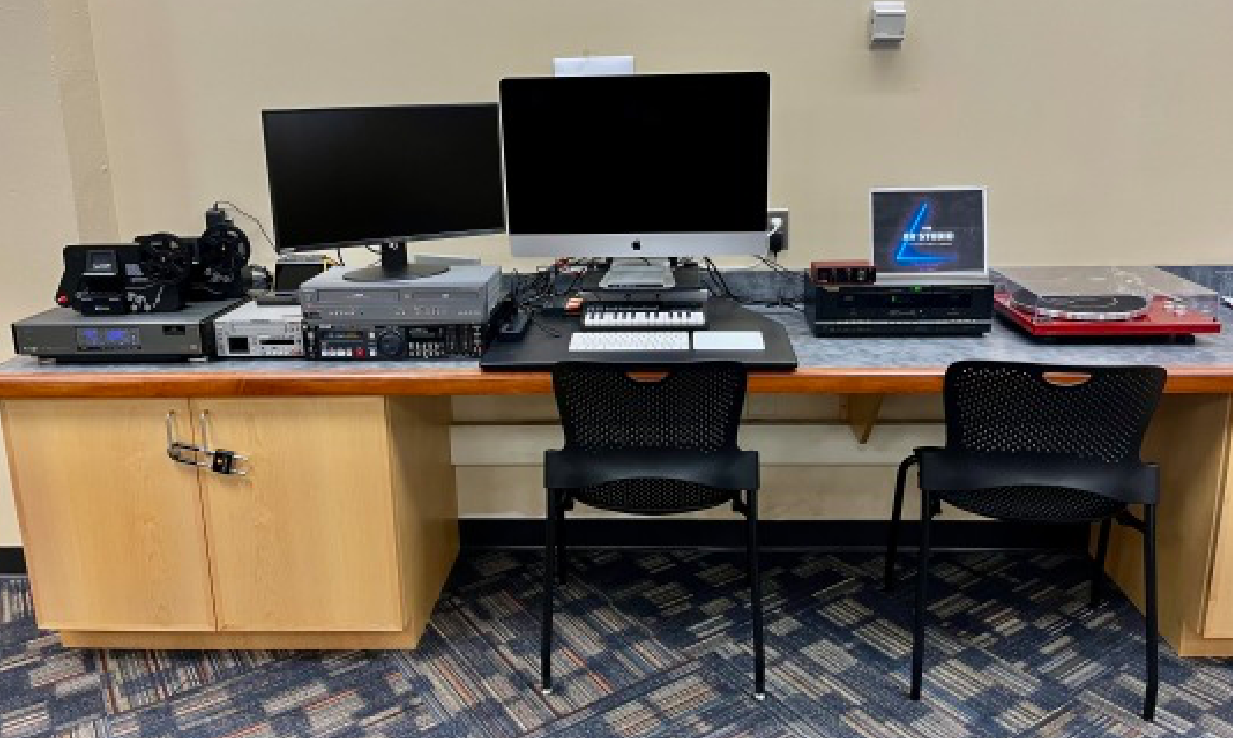
Do you have a lot of precious memories sitting around on outdated media formats like VHS tapes, audio cassettes, or photo slides? Digitize those memories in our new “AV Studio”, a fully equipped digital media lab for audio and video creation as well as digital conversion. 

Digital conversion is taking an old format like a VHS tape and converting it to a digital format, which can then be saved as a file on a computer or USB drive. We currently have equipment available with the capability of digitizing the following formats:

  • VHS Tape
  • VHS-C
  • HDV Tape
  • Mini DV Tape
  • Hi 8
  • Digital 8
  • Vinyl Record
  • Audio Cassette Tape
  • 8mm Film
  • Super 8 Film
  • DVD
  • Film Negatives (135, 110 and 126)
  • 50mm Slides

The equipment in the AV Studio is available for public use, by appointment. Call our Tech Coordinator Jared at 203-272-2245 ext. 33019 to book time with the equipment. Jared will walk you through using the equipment and get you started.

Another feature of the AV Studio is audio and video creation. We have a Mac computer equipped with professional quality software for creating and editing digital content. We currently have the following software available on the Mac:

  • Final Cut Pro X
  • Logic Pro X
  • Premiere Pro
  • After Effects
  • Photoshop
  • Audition
  • Animate
  • Lightroom
  • Media Encoder
  • Illustrator
  • Handbrake
  • VLC Media Player
  • Wondershare DVD Creator
  • Indesign

This gives creators free access to expensive, high-quality software to make professional quality content. This computer is available for use by appointment, call our Tech Coordinator at 203-272-2245 ext 33019 to book time.

The AV Studio was made possible by funds from Friends of the Cheshire Public Library.

Library Resources You Might Not Know About: Part 2

We recently highlighted some services & resources offered by Cheshire Library that may have been new to you. From a book-matching service to streaming video and online courses, the library has an abundance of free resources. Today we’ll highlight a few more you may not be aware of, that you don’t even need to have a library card to use.

Cheshire Library is constantly reviewing and adjusting our online services to bring  patrons what they need. The library is still here for you, even though how you use it these days might look a little different.

A Page Full of Freebies

When the shutdown happened in March 2020, our intrepid librarians started assembling a list of useful free resources that people could access from home. This expanded from Local (links to the CT Covid Response Page, 211 Directory, Cheshire School Meal Distribution)  and  National  (links to the CDC, NIH, WHO) Health Information to other resources that might help take the sting out of being isolated. Sites to access free online activities like virtual museum tours, webcams of animals and nature, interactive learning, and even armchair travel!

Community Service in a Virtual World

Many high school student are required to complete a set number of community service hours as part of their curriculum, but COVID-19 has made it difficult to volunteer in-person. We’ve designed a program (info on our Teen Page and monthly Event Calendars) where teens can earn community service hours by submitting a photo, video,  or other content for us to add to CPL’s social media pages. Ideas for submissions include book reviews, artwork, poetry, short stories, personal essays, photos or video of food you’ve cooked or baked, or any other creative idea you have for content. (Not all submissions will be used on our social media, and submissions including photos of people are not allowed.) Each submission will be awarded 2 community service hours.

Get WOWed by Our Newest Books and Dvds

If you’re not able to get into the library as often to check out what’s new, we’ve got a resource you’re going to love. We’ve teamed up with Wowbrary to deliver a list of the latest additions to our catalog straight to your inbox. The New Item Newsletter lets you know everything that’s new, digital items as well as physical items. In fact, you’ll learn about the physical books and dvds the minute we order them, before they even hit the shelf, and can place holds on them right away (you will need a library card for this part)!

No Printer? No Problem!

Many people have used our public printers in the past to print up important documents. Now you can do so without ever stepping foot inside the building. Our Mobile Printing Portal (accessed through the “Visit” tab on our website) allows you to send print jobs to us right from your computer or mobile device. We’ll let you know when your printouts are ready, and you can pick them up at the Grab ‘n Go station by the parking lot entrance.

Something Fun for Our Youngest Patrons

Our Baby Bop music & movement classes for infants 0-12 months and their caregivers has been on hiatus during the pandemic, but we’ve created a dozen free printable guides (find them on our Kids Page) of fun lap-sit songs, rhymes, and activities of music and movement to help develop motor and language skills. But mostly it’s just plain fun – playing is learning! We will add new guides periodically, so check back often!

Entertainment and Information in the Video Age

Finally, we encourage you to subscribe to our YouTube Channel. We’ve really stepped up our video content creation during this pandemic, and the results are on YouTube. From DIY tutorials, to lit tips,  to silly skits, to full length programs, we’ve got something for everyone to enjoy and learn from. You can even sit in on a Library Board meeting, if that’s your jam! Subscribe to be notified when we post something new.